
Procore
OneCore Procore-Xero Integration
Real-time, two-way sync between your project financials and Xero. The most widely used Procore–Xero integration, certified by both platforms
Your project financials and Xero, working as one
.svg)
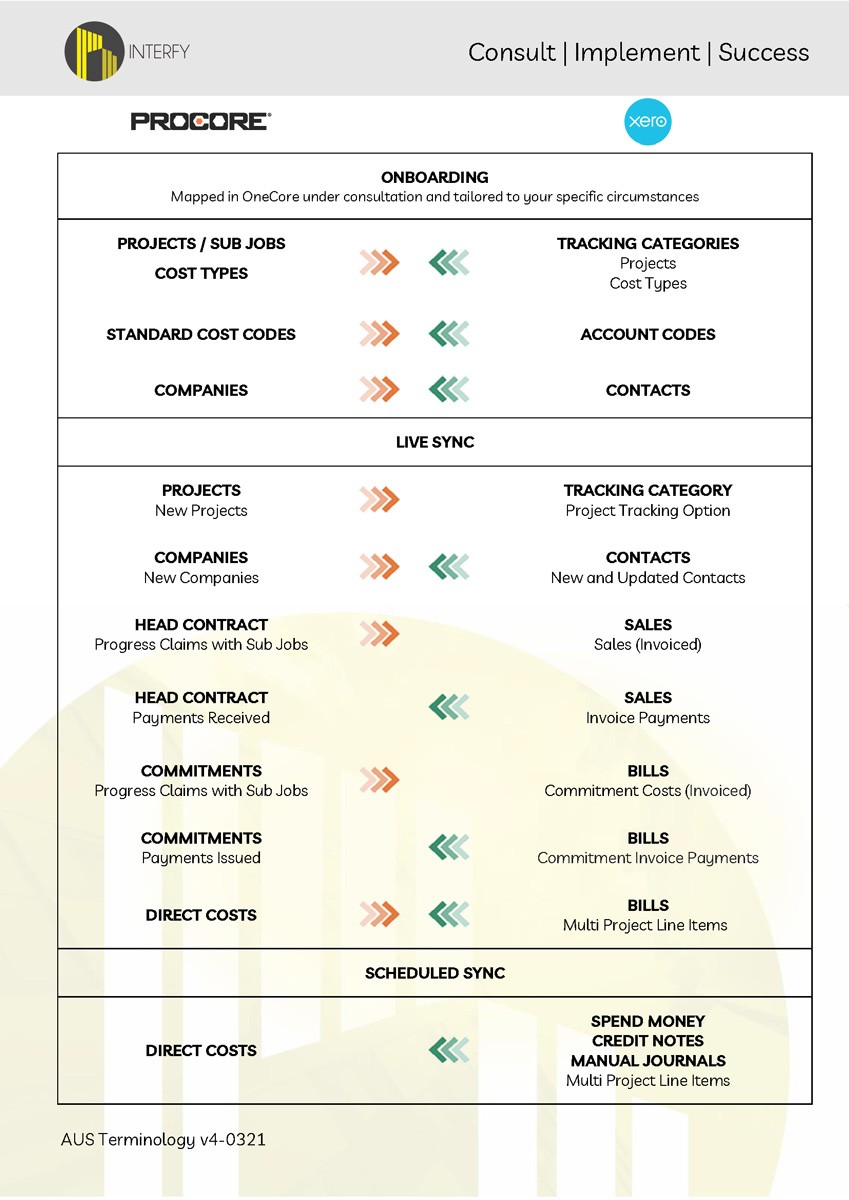
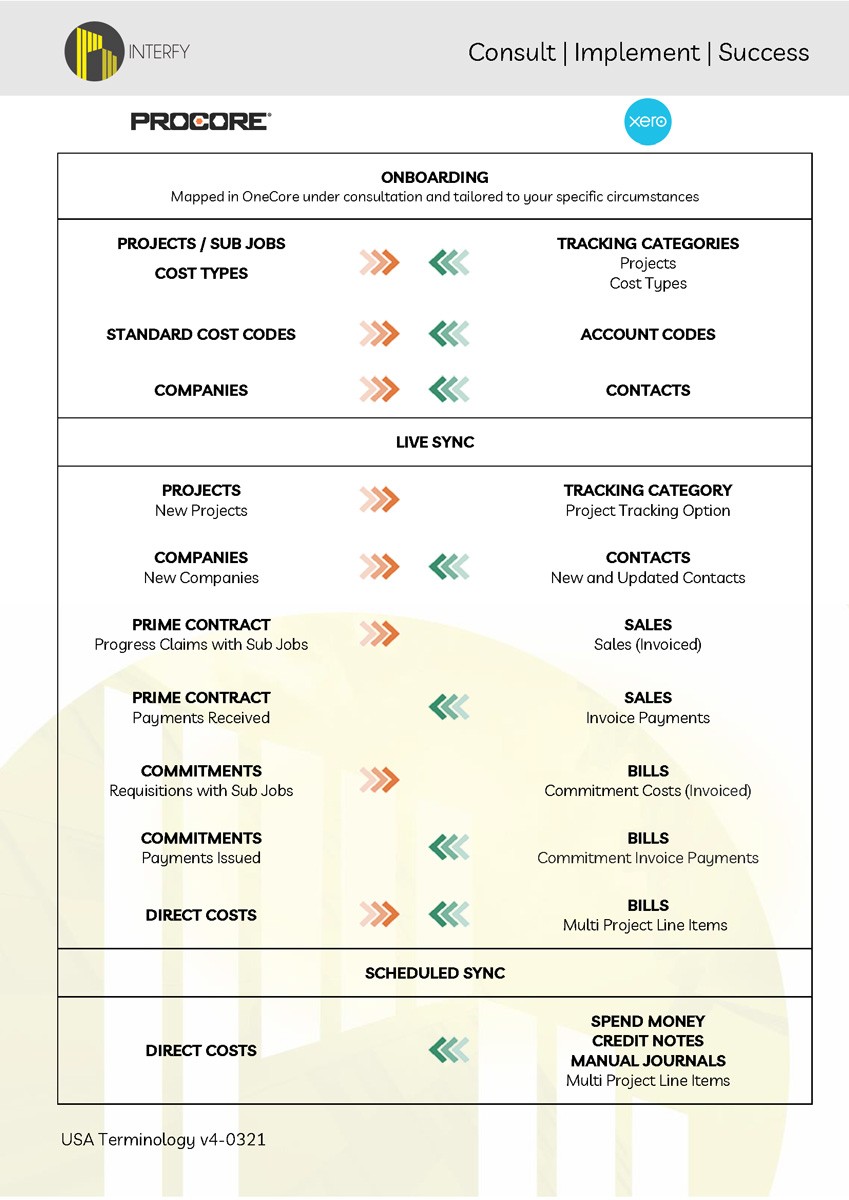
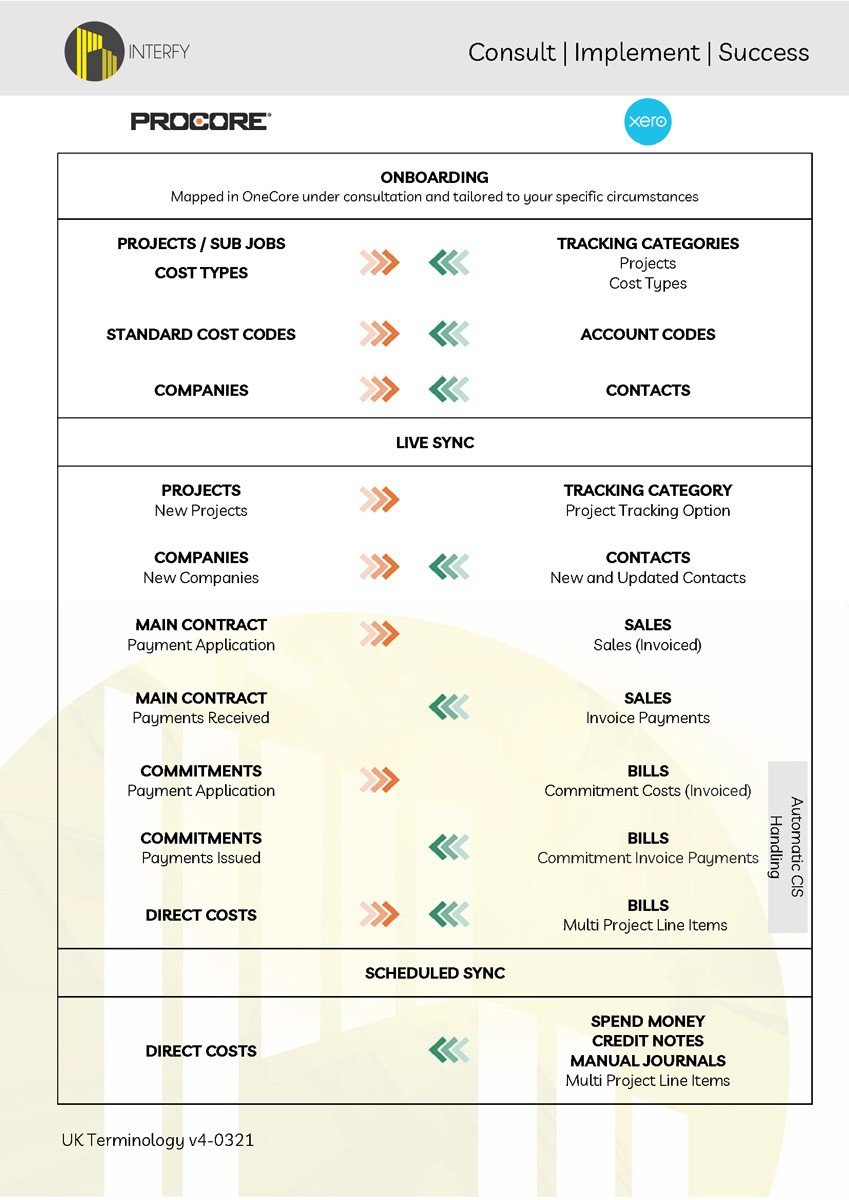
What syncs, and how
See exactly what data flows between Procore and Xero, and in which direction. Available in Australian, US, and UK terminology.


RestoreFast
Learn how RestoreFast doubled invoice processing capacity and tripled top-line value by integrating Procore and Xero with Interfy’s OneCore.
“The functionality and user interface are easy to navigate and very straightforward. The support team is just incredible”OneCore: “Most importantly, the solutions are scalable, so we are confident we can grow without ongrowing our systems again.”CostPlus: “CostPlus helps us see what has been claimed and what hasn’t, and produces the claims very quickly.”
“Without OneCore to connect Procore to our accounting software, we wouldn’t have switched our platform. The integration supports job costing, materials, timesheets – it’s essential to our functionality"“We highly recommend Interfy and OneCore for their integrity, value for money, and exceptional customer support”“What could take 20-30 minutes to figure out now takes five seconds. I have 100% confidence in Interfy’s OneCore – for their integrity and their friendly, helpful approach to business. We see it as real value for money.”
“Project managers need visibility on when an invoice should be paid, especially when managing several projects at once, it’s easy to miss a payment. We appreciate OneCore’s user-assigned, rather than project-assigned cost visibility using a traffic light system, ensuring that things don’t accidentally get delayed or missed”“…OneCore allows our invoicing information to be stored in one spot, instead of spreading it across different parts of ProCore. It’s about efficiency and speeding up the process”
Addons
Process supplier invoices faster – without opening Procore. Your accounts team works in familiar territory whilst maintaining complete commitment tracking.
Automatically batch direct costs to head contract claims. Identify reimbursables instantly, eliminate manual allocation, streamline your cost-plus billing.
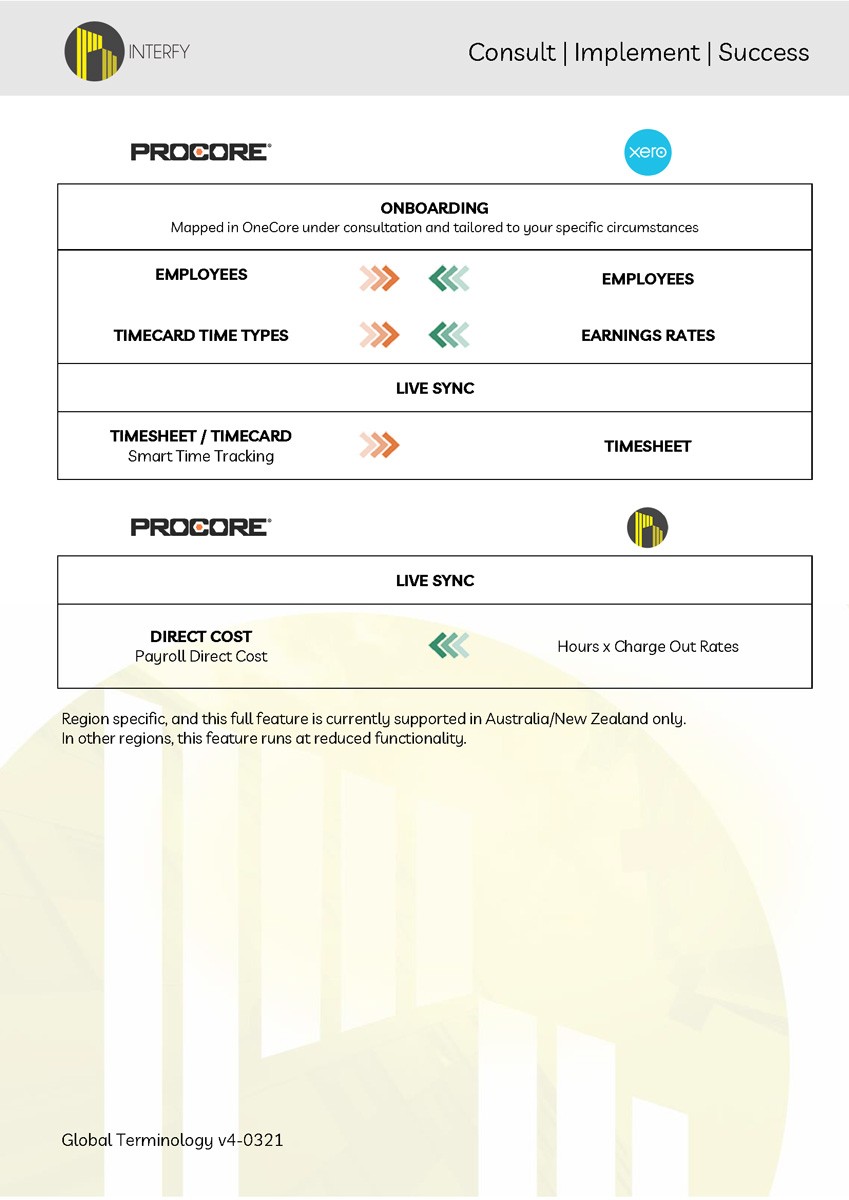
Transform timesheets into real-time project costs. Apply burden rates by role, handle complex EBAs, see labour costs hit projects immediately (not at month-end).
You’re in good hands from day one
We've onboarded over 700 construction businesses across the globe. Our process is structured to minimise disruption and set you up for long-term success, years beyond go-live.
Integration
Requirements
The following Procore product lines are required to use the Xero integration:
- Commitments
- Direct Costs
- Head Contract / Prime Contract
- Timesheets or Timecard (required for Payroll Plus add-on only)
Subscriptions and licensing:
- A valid Procore account with Admin access
- A valid Xero account with Standard access
For pricing and new integration enquiries: hello@interfyconnect.com
FAQs
OneCore is the most widely used integration that has been improved and iterated since 2017, and has a client base of over 800 customers.
Once a cost is approved in Procore, it’s pushed out to Xero straight away. However, you have the option of having the invoice as approved or in draft mode for review.
Simply update the cost in Procore and the changes will be reflected in Xero.
No, the integration is two way. Updates in Xero will feed back into your Procore budget.
Taxes are not included in your Procore Construction Financials. Xero will calculate the taxes for your invoices based off the account code that’s been mapped.
Our integration supports retention. We have multiple methods of handling retention between Procore and Xero.
Please contact us for a demo to see how it works.
We just need to map your cost codes and vendors, switch it on and then you’re good to go!
We are always testing Xero connected apps to determine compatibility with OneCore. Our Direct Costs module is compatible with Dext once bills are approved in Xero and it will automatically push these through to Procore.
Our integration platform sits in data centres stored in Australia (Amazon Web Services), and we only store skeleton records to provide you with audit history once the data has been sent between Procore or Xero.
We are an Australian-based company. Support is provided via phone during Australian and US business hours as well as e-mail support.

Ready to simplify your systems?
Book a demo and see how Interfy can transform your workflow.

